
THE SHORT ANSWER
Press ROLL and wait for the final pet result. Once its upgrade is available, buy Auto Roll for $1.2K cash in UPGRADES, then tap AUTO beside ROLL; green ON! indicates it is enabled. Lucky Roll has a separate $15K upgrade and advances through a counter to NEXT! and LUCKY! before restarting. Rolling also advances Professor Paws's tracked ROLL 100 TIMES objective.
Roll and Read the Final Pet Result
- Press the red ROLL button at the bottom of the screen.
- Let the reveal animation finish, or use SKIP when it appears.
- Read the final pet's name and 1 IN label. Pets moving through the animation are not all rewards from that roll.
A newly discovered Lily Frog can show NEW and 1 IN 16. A RARE ROLL reveal can finish with Coral Turtle, labeled RARE and 1 IN 9,600. These labels help you identify the completed result; the 1-in number is not a guaranteed number of rolls needed to obtain that pet.
Look up other results in the pet list. For persistent reveal and popup preferences, see the roll animation settings.
Unlock Auto Roll and Turn It On
- Click the green upward arrow at the lower left to open UPGRADES.
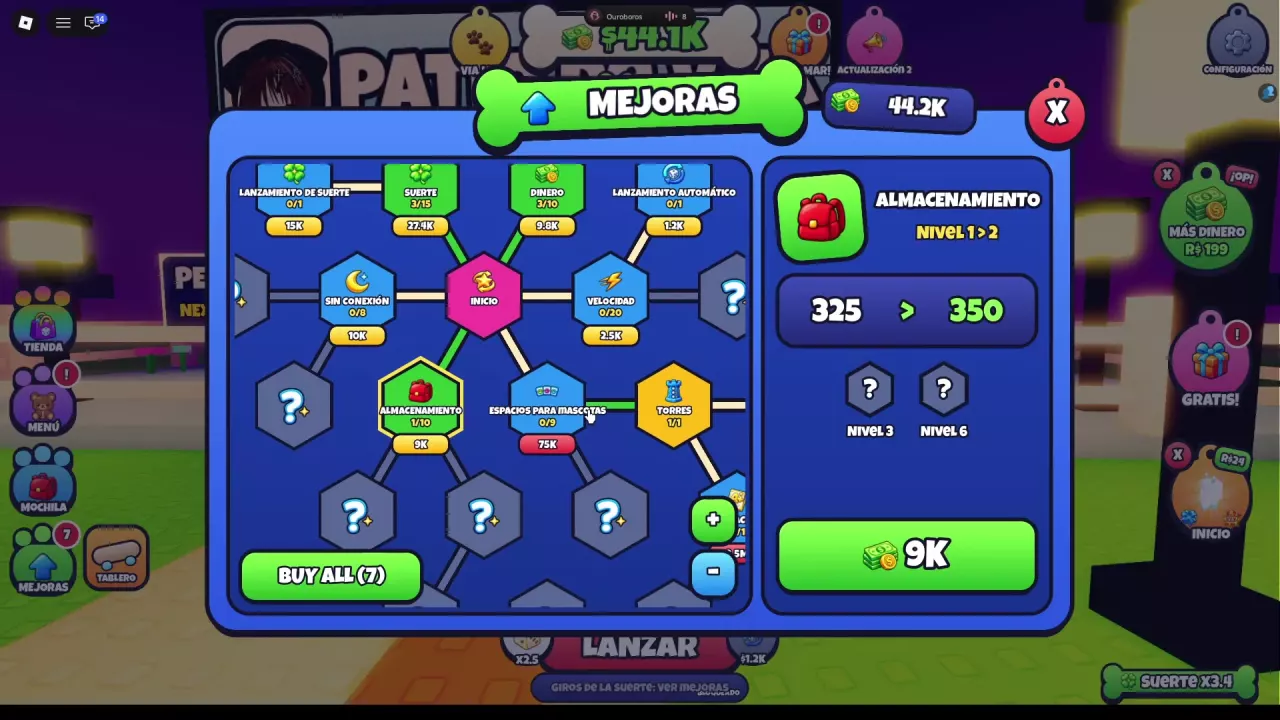
- Find Auto Roll. Its unpurchased node shows 0/1 and costs $1.2K cash. In Spanish, the node is Lanzamiento automático.
- When the node is available and you have enough cash, select it and buy the upgrade.
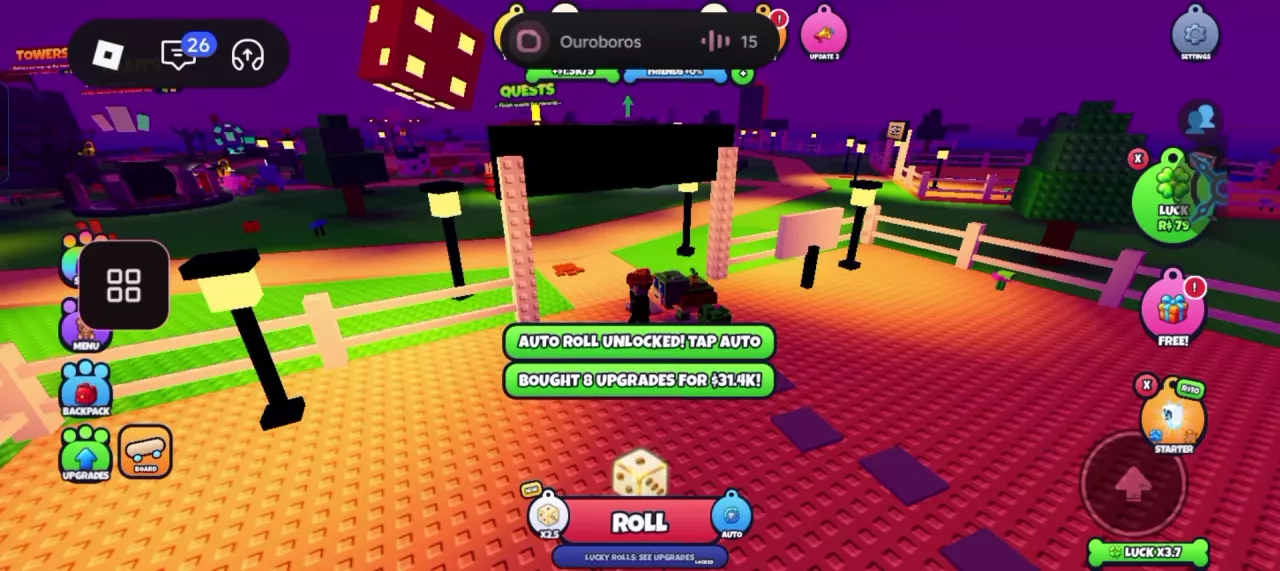
- Look for AUTO ROLL UNLOCKED! TAP AUTO, then tap AUTO immediately to the right of ROLL.
- Check the control's state: green ON! indicates automatic rolling is enabled. The Spanish control is labeled AUTOMÁTICO.
If repeated clicking is your main inconvenience, prioritize this available node: it directly removes that repeated action. Buying the upgrade unlocks the control; use the button beside ROLL to turn it on.
BUY ALL can also include Auto Roll among affordable upgrades, but its purchase notification reports the entire batch. For example, 8 upgrades for $31.4K is a batch total, not Auto Roll's individual price. Select Auto Roll directly when you want to control your spending. See the upgrade tree guide for navigation, other nodes and buying choices.
Follow the Lucky Roll Counter
Lucky Roll is a separate upgrade from Auto Roll. Auto Roll repeats the rolling action; Lucky Roll adds a repeating special-roll counter. The unpurchased Lucky Roll node shows 0/1 and costs $15K cash in UPGRADES.
- Unlock Lucky Roll through its upgrade node when available.
- Keep rolling and watch the progress bar and remaining-roll indicator below ROLL.
- Watch for NEXT!, followed by the button's LUCKY! state.
- Continue rolling after the lucky result; the counter starts again.
Read the multiplier on your active row. An active ×2 row and an active ×3 row are both possible displayed states; use the value on your own screen. The Spanish lucky-button label is AFORTUNADO. A separate ×5 row marked LOCKED is not an active bonus. If the Lucky Rolls area itself is locked and points to Upgrades, return to the upgrade tree.
Use the on-screen counter to tell when the next lucky roll is coming. For the broader distinction between luck sources and pet rarity labels, see luck and odds explained.
Super Rolls and Jackpot Rolls: Labels and Sources
Super Rolls carry a LUCK ×100 label; Jackpot Roll carries LUCK ×1,000. Jackpot Roll therefore has the higher listed luck multiplier. These are separate special-roll items from the repeating Lucky Roll counter.
- Group reward: Open FREE! on the right and find JOIN THE GROUP. The offer lists 2 Super Rolls, alongside 10 Shards. Its JOIN button opens the RAC Studio community prompt. Start here if you want the free Super Roll offer; see group reward instructions for that reward channel.
- Starter Pack: Open STARTER on the right. The one-time pack includes 3 Super Rolls and 1 Jackpot Roll. It is a source of both special-roll types; check the Starter Pack price and full contents before deciding whether to buy it.
| Name | Listed luck multiplier |
|---|---|
 Super Roll Super Roll |
100 ×
(Starter Pack item label)
|
 Jackpot Roll Jackpot Roll |
1000 ×
(Starter Pack item label)
|
-
Super Roll
- Listed luck multiplier
- 100 × (Starter Pack item label)
- Icon
- Blue four-leaf clover
-
Jackpot Roll
- Listed luck multiplier
- 1000 × (Starter Pack item label)
- Icon
- Red-and-gold 777 slot machine
Advance Professor Paws's 100-Roll Objective
Find QUESTS inside the left-side MENU. When Professor Paws's ROLL 100 TIMES objective appears in the upper-left tracker, use the same bottom ROLL button to advance it.
Follow the objective's rolls completed / 100 counter. A reading of 2/100 means two rolls toward this objective. The separate 0/10 quest-group counter tracks a different level of progress; it does not change the objective's requirement of 100 rolls.
Keep rolling and check the counter beneath the objective text to see your progress toward 100.