
AT A GLANCE
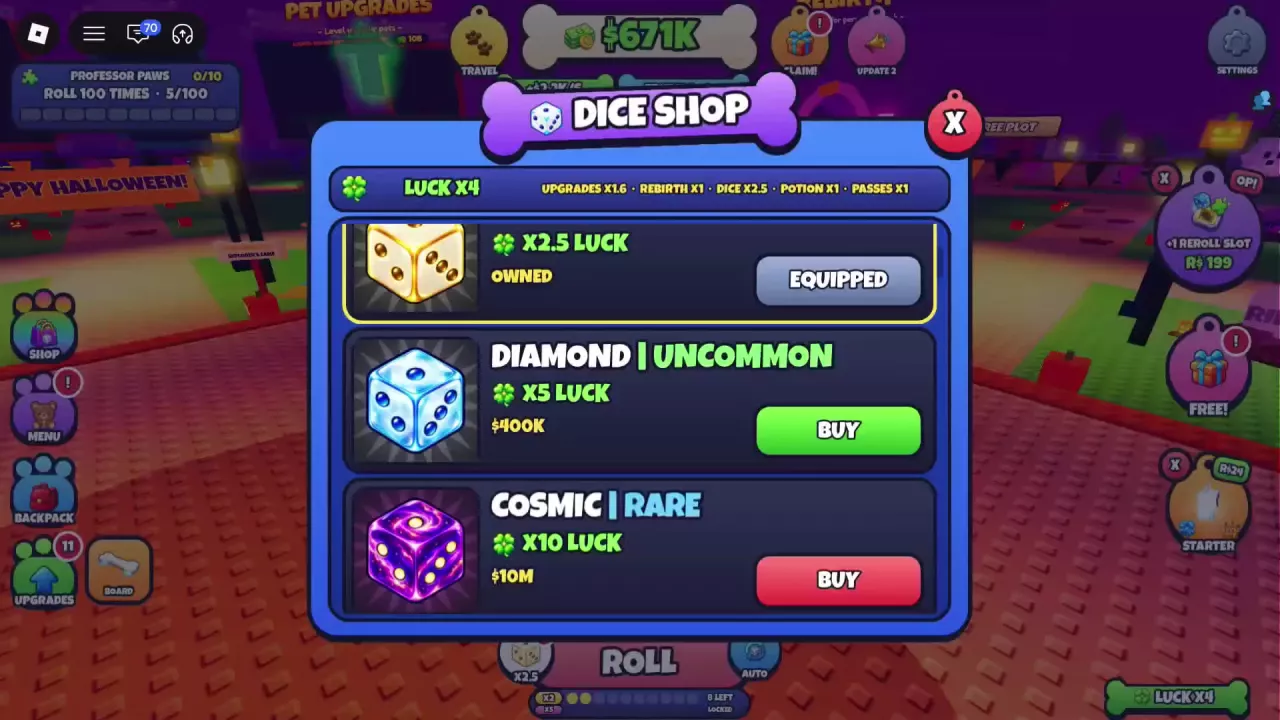
Golden costs 20,000 cash for ×2.5 die luck, Diamond costs 400,000 for ×5, and Cosmic is listed at 10,000,000 for ×10. Open Dice Shop through the current-die icon beside ROLL or the tutorial’s GO! button. Buying Golden or Diamond makes it your active die; check its icon and multiplier beside ROLL.
Dice Prices and Luck Multipliers
These three dice are sold for in-game cash in Dice Shop. The prices below are each die’s purchase price. K means thousand; M means million.
Golden and Diamond provide their die multiplier while active; Cosmic’s shop entry lists ×10. The die multiplier is one part of your total luck, so the overall LUCK display can show a different number. See how luck sources and pet odds labels work for that breakdown.
| Name | Price | Rarity | Die luck multiplier |
|---|---|---|---|
 Golden Die Golden Die |
20000 cash
(Dice Shop purchase)
|
Uncommon
|
2.5 ×
(Permanent per-roll benefit while this die is active)
|
 Diamond Die Diamond Die |
400000 cash
(Dice Shop purchase)
|
Uncommon
|
5 ×
(While this die is active)
|
 Cosmic Cosmic |
10000000 cash
(Dice Shop listing)
|
Rare
|
10 ×
(Dice Shop listing)
|
-
Golden Die
- Price
- 20000 cash (Dice Shop purchase)
- Rarity
- Uncommon
- Die luck multiplier
- 2.5 × (Permanent per-roll benefit while this die is active)
-
Diamond Die
- Price
- 400000 cash (Dice Shop purchase)
- Rarity
- Uncommon
- Die luck multiplier
- 5 × (While this die is active)
-
Cosmic
- Price
- 10000000 cash (Dice Shop listing)
- Rarity
- Rare
- Die luck multiplier
- 10 × (Dice Shop listing)
Choose a Die for Your Cash Budget
- Choose Golden if you still use the starting die and have 20K cash to spend. Its ×2.5 multiplier gives you an accessible first die upgrade.
- Choose Diamond if you can afford 400K and want more rolling luck. Its ×5 die multiplier is twice Golden’s. It is the practical middle option when Cosmic’s price is still out of reach.
- Aim for Cosmic if you can spare 10M for the next increase. Its listed ×10 multiplier is twice Diamond’s, but its purchase price is 25 times as high. Staying with Diamond while saving is a reasonable choice when that cash commitment is too large.
For a savings estimate, enter your current cash, effective income per second and target die price in the online income and savings calculator. Pets placed on pedestals generate ongoing cash; the money guide explains how to choose pets for your current income setup.
Open the Shop, Buy and Check the Active Die
- Open Dice Shop. Click the current-die icon beside ROLL at the bottom of the screen. During the new-die tutorial, you can also select GO!.
- Find the die you want. Check its name, cash price and luck multiplier, and make sure your balance covers the purchase.
- Select BUY on its entry. For Golden, choose the 20K entry with ×2.5 luck. For Diamond, choose the 400K entry with ×5 luck.
- Let the acquisition reveal finish, then check beside ROLL. Golden becomes the cream-white die with gold edges and pips, showing ×2.5. Diamond becomes the icy-blue and white die with blue pips, showing ×5. Both become active after purchase without a separate equip step. The shop also marks the active die EQUIPPED.
In the Spanish interface, look for Tienda de dados (Dice Shop), Dorado (Golden), Cósmico (Cosmic), ¡VAMOS! (GO!) and COMPRAR (BUY).
Once your new die is active, return to ROLL. For automatic rolling and the separate Lucky Roll system, see the rolling guide.