
AT A GLANCE
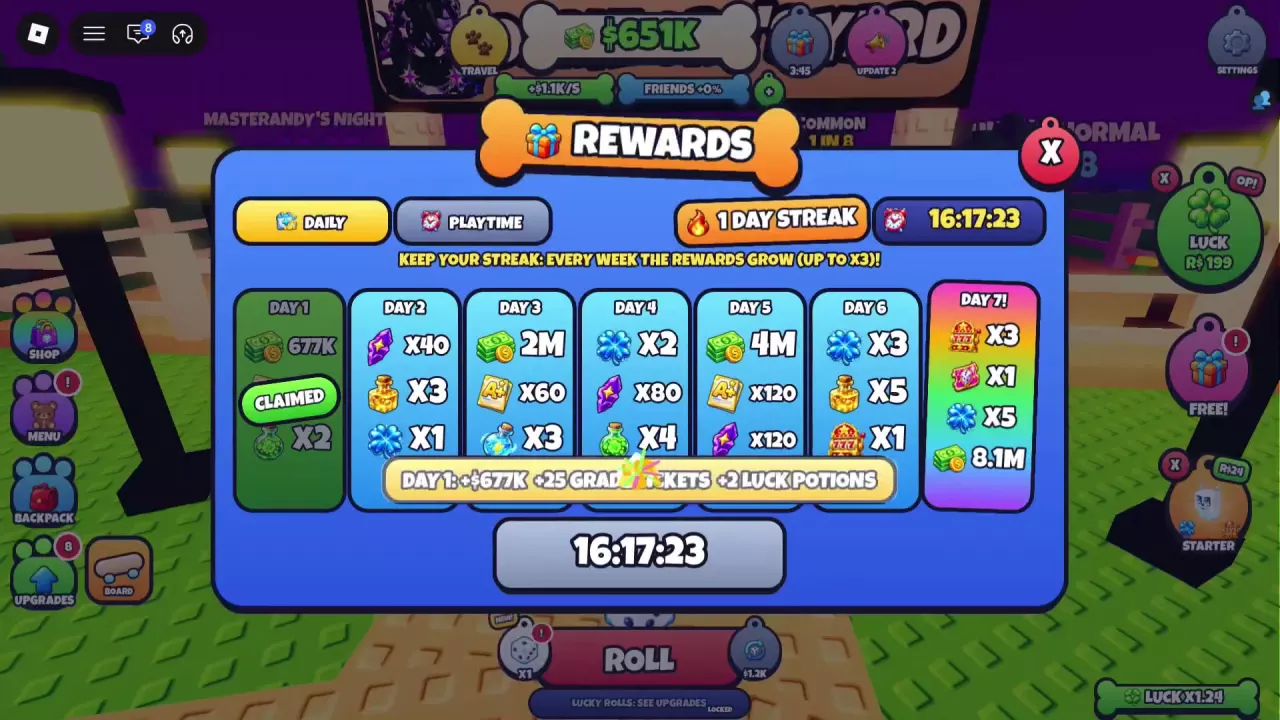
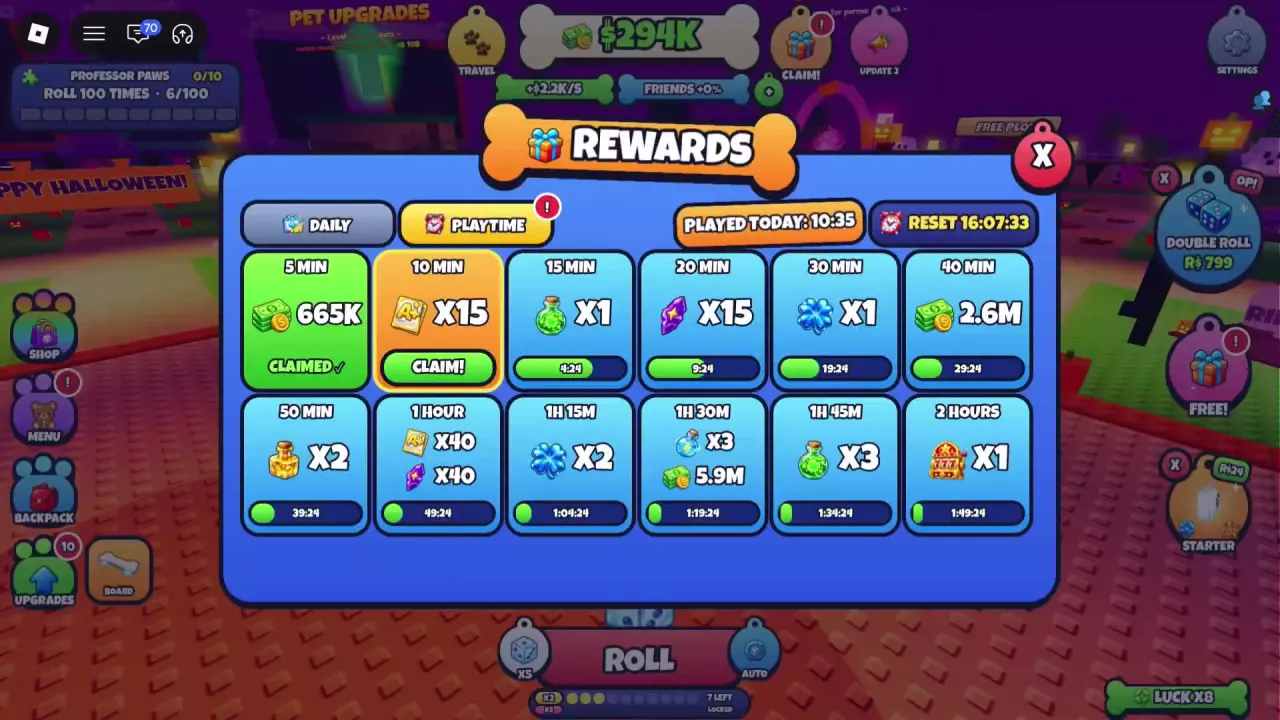
Open the top gift icon for REWARDS → DAILY or PLAYTIME, and the right-side FREE! gift for group and like offers. Day 1 gives 25 Grade Tickets, 2 Luck Potions and a variable cash reward. The 10-minute playtime gift gives 15 Grade Tickets. Joining RAC Studio offers 2 Super Rolls and 10 Shards; liking the game rewards 60 Quest Tickets when CLAIM is available.
Find the Two Reward Menus
Use the top gift icon to open REWARDS, which contains the DAILY and PLAYTIME tabs. The separate FREE! gift icon on the right opens FREE REWARDS for the group and like offers.
| Channel | Where to look | Requirement | Reward |
|---|---|---|---|
| Daily | Top gift → DAILY | Today's reward is available | Day 1: 25 Grade Tickets, 2 Luck Potions and cash |
| Playtime | Top gift → PLAYTIME | Reach the required playtime today | 10 minutes: 15 Grade Tickets; the 1-hour tile also lists 40 Grade Tickets |
| Group | FREE! → JOIN THE GROUP | Join RAC Studio | Offer lists 2 Super Rolls and 10 Shards |
| Like | FREE! → LIKE THE GAME | Like the game and have CLAIM available | 60 Quest Tickets |
Start with any daily or playtime gift that is already available, then check the social offers. To look up a particular currency or item, use the resource guide. Collection milestones have their own rewards in the Pet Dice Index.
Claim Daily Rewards and Build a Streak
- Select the top gift icon, marked CLAIM when a gift is ready.
- Open DAILY in the REWARDS menu.
- Find the available day and press its claim button.
- Check that the day changes to CLAIMED, then read your streak and the countdown to the next daily claim.
The menu displays seven days of rewards. Day 1 includes 25 Grade Tickets and 2 Luck Potions, plus cash. Read the cash amount on your own reward tile; it varies between accounts rather than being one fixed Day 1 payout.
Keep claiming on consecutive days to build your streak. Rewards increase each week, up to ×3. Your streak appears near the upper right of the panel, beside the timer. After claiming, the next-claim countdown also appears at the bottom.
Claim Playtime Gifts
- Open the top gift icon and select PLAYTIME.
- Check PLAYED TODAY at the top of the panel to see your accumulated playtime for the day.
- Once the 10 MIN tile is ready, press CLAIM! on that tile.
- Look for PLAYTIME GIFT: +15 GRADE TICKETS to confirm the reward.
Each tile has its own playtime requirement. An unavailable tile shows a countdown, while a collected gift shows CLAIMED. The 1 HOUR tile lists 40 Grade Tickets, so check it when you reach that threshold during a longer session.
The RESET countdown is at the upper right, beside PLAYED TODAY. Use that timer to see how long remains in the current daily playtime period.
Find Group and Like Rewards
Open the FREE! gift icon on the right side of the screen to find both social offers.
Join RAC Studio
- Find JOIN THE GROUP in FREE REWARDS.
- Select JOIN to open the Join RAC Studio prompt.
- Choose Join Community to join. Not Now dismisses the prompt.
The group offer lists 2 Super Rolls and 10 Shards. For how Super Rolls compare with other roll types, see the special-roll guide.
Claim the like reward
- Find LIKE THE GAME and use its LIKE entry to like the game.
- When CLAIM is available on the offer, select it.
- Check for the +60 QUEST TICKETS! notification to confirm receipt.
These are Quest Tickets; keep them separate from the Grade Tickets earned through daily and playtime gifts.